Showing posts with label Computer security. Show all posts

Free Antivirus From Official Microsoft - Official Microsoft Security Essentials

OFFICIAL MICROSOFT SECURITY ESSENTIALS
Microsoft Security Essentials is built for individuals and small businesses, but it’s based on the same technology that Microsoft uses to protect giant businesses (security products like Microsoft Forefront, the Malicious Software Removal Tool, and Windows Defender). We have a whole team watching for new threats and coming up with ways to squash them.

New Features
  • Automatic malware remediation for enhanced protection. 
  • Performance enhancements. 
  • Simplified UI to make it easier to use. 
  • New and improved protection engine for better security.
 System Requirements
Operating System : Windows XP Service Pack-3(SP3), Windows Vista (Service Pack 1; Service Pack 2, Windows 7.
For Windows XP, a PC with a CPU clock speed of 500 MHz or higher, and 256 MB RAM or higher.
For Windows Vista and Windows 7, a PC with a CPU clock speed of 1.0 GHz or higher, and 1 GB RAM or higher.
VGA display of 800 × 600 or higher.
200 MB of available hard disk space.
An Internet connection is required for installation and to download the latest virus and spyware definitions for Microsoft Security Essentials.
Internet Browser : (Windows Internet Explorer 6.0 or later); (Mozilla Firefox 2.0 or later).
Microsoft Security Essentials also supports Windows XP Mode in Windows 7.

Downloads
Microsoft Security Essentials 4.1.522.0 RTM for Windows XP, Vista, 7 32-bit [10.6 MB]Microsoft Security Essentials 4.1.522.0 RTM for Windows Vista, 7 64-bit [12.9 MB]

Offline Update for Windows XP, Vista, 7 32-bit
 Virus Definition UpdateNetwork Inspection System Update
Offline Update for Windows Vista, 7 64-bit
Virus Definition UpdateNetwork Inspection System Update
Note : RTM 4.1.522.0 available in the online update via Windows Update, and also available offline installer for offline computer.

File Recovery 4.0 PC Inspector

PC Inspector File Recovery is a Data Recovery Program that supports the FAT 12/16/32 and NTFS file systems.
Here are some new features in PC Inspector File Recovery:
  • Find partitions automatically, even if the boot sector or FAT has been erased or damaged.
  • Restoring files with the original time and date stamp.
  • Supports the saving of recovered files on network drives.
  • Recovers files, even when a header entry is no longer available.
Competition products can not recover the file. The "Special Recovery Function" supports the following disk formats: ARJ, AVI, BMP, CDR, DOC, DXF, DBF, XLS, EXE, GIF, HLP, HTML, HTM, JPG, LZH, MID, MOV, MP3, PDF, PNG , RTF, TAR, TIF, WAV, and ZIP.
DOWNLOAD

Cara Mengatasi Komputer dari Gangguan Virus WaterMark.exe

Apa Computer anda sedang mengalami gangguan yang sangat mengganggu aktivitas anda saat menjalankan program di computer..? mungkin ganguan itu berupa virus, seperti WaterMark.exe. Virus ini sangat membuat kita jengkel.

Menurut beberapa sumber WaterMark.exe ini adalah Virus atau Spyware yang sangat mengganggu computer anda. Susah untuk mengatasinya, jika anda ingin mendelete tentunya akan keluar "Cannot Delete" yang artinya tidak bias di hapus atau di delete. Untuk mengatasinya, mungkin terpikir oleh anda untuk menginstal ulang computer.. Tetapi saat ini anda belum punya waktu untuk menginstalnya.
Setelah surfing-surfing internet saya menemukan beberapa cara bagaimana cara mengatasi virus yang membandal seperti WaterMark ini.

Caranya adalah Sebagai Berikut:
1. Pertama-tama Buka "Task Manager" Jika anda blm tau cara membuka nya.. tinggal tekan    
    "Ctrl+Alt+Del"
2. Setelah "Task Manager"nya sudah Terbuka Lalu Lihat Pada Tab "Process" dan Temukan yang 
    "svchost.exe" dengan Username nama Computer anda. Biasanya ada 2, lalu "End Process" kedua-duanya.
3. Kemudian Buka Run dengan cara klik Program pada Computer anda lalu pilih Run. Note : "Task 
    Manager"nya Biarkan terbuka (Jangan di Close).
4. Setelah Run nya terbuka, lalu ketik "cmd" lalu "Enter".
5. Kemudian ketik CD dan Enter.
6. Lalu Ketik lagi CD lalu Enter sampai Command dihalaman Run terlihat C:\
7. Setelah itu Ketik "cd program files/Microsoft" lalu Enter.
8. Ketik lagi pada halaman Command "cd program files/Microsoft" terus Enter,
9. Kemudian Ketik "del Watermark.exe /a /s" lalu Enter.
10. Lalu Kemudian ketik "md Watermark.exe" dan Enter
11. Ketik lagi "cd Watermark.exe" lalu Enter.
12. Selanjutnya ketik "md con\\" dan Enter.
13 Terakhir Restart Windows Computer anda.
Setelah anda Merestart Windows Computer anda. Lalu buka kembari Run-nya.
Setelah Halaman Run terbuka, ketik "regedit" untuk masuk ke halaman "Registry Editor"
Pada halaman Registry Editor, anda masuk pada halaman "HKEY_LOCAL_MACHINE" pilih "Software" Lalu "Microsoft" kemudian "Windows NT, lalu "CurrentVersion" dan Winlogon. Pada Winlogon anda Lihat pada sebelah kanan bawah "Userinit"
14. Klik 2x Pada "Userinit" dan lihat Value Data-nya "c:\windows\system32\userinit.exe, c:\program files\microsoft\WaterMark.exe" ganti menjadi "c:\windows\system32\userinit.exe"
15. Refres Halaman Registry Editor-nya dengan tekan F5, lihat apakah Userinitnya berubah atau Tidak..
Jika Value Data dari "Userinit" tersebut tidak berubah, itu menandakan Extation WaterMark.exe yang selalu mengganggu sudah tidak berfungsi lagi karena sudah digantikan dengan Folder WaterMark.exe.
Jadi Inti dari pada Cara ini adalah Menggantikan File Watermark.exe "Virus atau Spyware" dengan Folder WaterMark.exe yang tidak bias di hapus atau di Delete.
Ok sampai disini Dulu Penjelasan saya Tentang Mengatasi gangguan Virus WaterMark.exe Pada Computer anda.. Mudah-Mudahan ini dapat membantu anda agar tidak Menginstal Ulang computer tersebut.

Default BitDefender Total Security 2011 Build 14.0.24.337

BitDefender Total Security 2010 Build 14.0.24.337 | 226 Mb

BitDefender Total Security 2011 provides comprehensive proactive protection against all Internet security threats, along with system maintenance and backup, without slowing down your PCs. Combines Superior Proactive Protection from e-Threats with Backup and PC Tune-up for the Ultimate in Security... that won’t slow you down! BitDefender®, a global provider of award-winning antivirus software and data security solutions, has launched BitDefender2011 – its new line of security solutions providing state-of-the-art proactive protection from today’s most damaging viruses, spyware, hackers, spam, phishing attacks, and other common Internet security threats.

BitDefender Total Security features Antivirus, Firewall, Antispyware, Privacy Control, Parental Control, TuneUp (registry cleaner, PC cleaner, file schredder, disk defragmenter), BackUp Manager for corporate and home users.
BitDefender Total Security provides the ultimate proactive protection for your PCs. It combines state of the art protection against viruses, spyware, hackers, spam and other Internet security threats. Its system maintenance and PC backup tools keep your PC running fast and protected from data loss.

BitDefender Total Security is designed for users who desire the ultimate in protection from Internet security threats and data loss, with integrated backup and PC maintenance tools to keep their PC running at peak performance. Total Security includes all of the features and benefits of Antivirus and Internet Security, as well as the following new features:
• Data backup – safeguarding data by creating backup copies to local and removable drives, CD-R/RW or DVD-R/RW
• PC Tune-up – improving PC performance by removing unnecessary files and registry entries
• Trace clean-up – which completely erases files and “traces” of files from disks to prevent recovery

BitDefender Total Security includes an enhanced feature set:
• Online Backup: BitDefender offers users the ability to backup sensitive data online to ensure it is secure if something goes wrong – like your computer is stolen or a hard drive failure. Unlike competitive offerings, BitDefender Online Backup offers incremental, versioned and differentiated backup modes to better meet customer’s specific needs.
• Increased Privacy Protection through Instant Messaging Encryption: Supporting Yahoo! Messenger and MSN Messenger, BitDefender ensures that no one can eavesdrop on instant messaging traffic between two PCs with BitDefender installed
• Increased Storage Protection with File Vault: With BitDefender File Vault, a secured storage space for personal information or sensitive files kept locally in your computer, encrypted data is stored that is invulnerable to theft or to a security breach.
• Improved Integrated Online Security: BitDefender Total Security provides users a full range of proactive protection technologies for secure everyday online activities such as banking, shopping, browsing or socializing. Web, email and Instant messaging traffic are now scanned in real-time for viruses, spyware, phishing and identity theft attempts.
• More control via Home Network Management: For home users, BitDefender provides the ability to manage the security of a home network from a single location. BitDefender software from other computers in the network can be remotely configured, while tasks such as scans, tune-ups and updates can be scheduled and run.
• Other Improvements include: an improved Gamer mode, a Laptop mode, increased performance with lower resources consumption, enhanced usability, and firewall (IDS and IPv6 support) support.

BitDefender Total Security provides comprehensive proactive protection against all Internet security threats, along with system maintenance and backup, without slowing down your PCs.

Confidently download, share and open files from friends, family, co-workers – and even total strangers
• Protects against viruses and other malware using industry-leading technology NEW
• Scans all Web, e-mail and instant messaging traffic in real-time
• Provides an unmatched detection rate of new threats based on two different proactive technologies
• Blocks spyware programs that track your online activities

Protect your identity: shop, bank, listen and watch, privately and securely
• Blocks web pages that attempt to steal your credit card data
• Prevents personal information from leaking via e-mail, Web or instant messagingNEW
• File Shredder permanently erases sensitive files and traces of files

Guard your files and conversations with top-of-the line encryption
• Instant Messaging Encryption keeps your conversations private on Yahoo! and MSN Messenger
• File Vault securely stores personal information or sensitive files
• Automatically backs up files and folders

Connect securely to any network at home, at the office, or away
• The two-way firewall automatically secures your Internet connection wherever you are
• Wi-Fi monitor helps prevent unauthorized access to your Wi-Fi network

Protect your family and their computers
• Parental Control blocks access to inappropriate websites and e-mail
• Limits kids’ access the Internet, games, etc. to specific times
• Makes it easy for you to manage the security of your network from a single location

Play safely, play seamlessly
• Reduces the system load and avoids requesting user interaction during game play

Get fine-tuned performance from your computer!
• Removes unnecessary files & registry entries, for improved performance
• Optimized scanning technology skips safe files for better scan speed and lower system load
• Antispam stops unwanted e-mail from reaching your Inbox
• Laptop Mode prolongs battery life

Let professionals solve any security issues
• Assistance with common issues built directly into the product
• Free technical support for the entire duration of the product licens

New and Improved in BitDefender Total Security 2011:
* Quick Scan. The new Quick Scan uses in-the-cloud technology for better detection and improved response time to new and unknown viruses.
* Dashboard Shortcuts. All BitDefender 2011 products enable users with specific needs—like parents and gamers—to create their own dashboard and shortcuts to frequently-used functions.
* Search Advisor. BitDefender 2011 provides safety ratings for search results and warnings about visited websites that may contain spyware or other malware.
* Smart Help. BitDefender now includes a series of personalized suggestions, warnings, and safeguards that are relevant to the recent activity performed by the user.
* Video Tutorials. Get instant support and viewing of video tutorials that take you step by step through the actions required to configure BitDefender.
* Improved Parental Control. Parents have remote access to review children's online activity and change parental control settings.
* Performance Optimizer. Detect which applications are slowing down the PC and suggests corrective actions to improve the performance.
source

NetLimiter 3 Pro v3.0.0.10


NetLimiter 3 Pro v3.0.0.10

NetLimiter is an ultimate internet traffic control and monitoring tool designed for Windows. You can use NetLimiter to set download/upload transfer rate limits for applications or even single connection and monitor their internet traffic. Along with this unique feature, Netlimiter offers comprehensive set of internet statistical tools. It includes real-time traffic measurement and long-term per-application internet traffic statistics.
DOWNLOAD

Avira AntiVir Premium | V 10.0.0.603

Avira AntiVir Premium V 10.0.0.603 Plus Key Till 2012 | 44.48 Mb | AntiVir Premium 10.0.0.601 | 52 MB

Avira AntiVir Premium reliably protects you against all threats from viruses, worms, trojans, rootkits, phishings, adware, spyware, bots, and dangerous drive-by downloads. Best detection rates and top-class security with several updates every day.

Advanced protection: Includes basic antivirus protection PLUS : email protection (POP3) , AntiPhishing,
 AntiSpyware, AntiAdware and more.

With real-time on-access scanning, profile-based
on-demand scans and scheduling of full system scanning and updates it offers premium protection. It includes a POP3 based MailScanner that scans emails before they are stored on your machine. With a user-friendly control center, quarantine management, fast performance and world leading detection rates the Avira AntiVir Premium provides essential protection for your PC.

Features :

Premium Protection :
* AntiVir
* AntiAd/Spyware
* AntiPhishing
* AntiRootkit
* AntiDrive-by
* AntiBot
* EmailScanner
* WebGuard
* RescueSystem

Premium Functions :
* Protection against viruses, worms and Trojans
* Protection against expensive dialers
* Detects and deletes rootkits
* NEW: Raised scan speed
* NEW: Redesigned visual appearance
* Protection against phishing
* Protection against spyware
* Special protection against email viruses (POP 3)
* Fast updates through Premium Server
* 5 Euro donation to Auerbach Foundation
* Protection against annoying adware
* NEW: System to create a Rescue-CD

Operating Systems :
- Microsoft Windows 2000, SP 4
- Microsoft Windows XP Home or Professional, SP2
- Microsoft Windows Vista (32 or 64 Bit)
- Microsoft Windows 7 (32 or 64 Bit)
Genre: Program |Language: English |OS: Windows XP / Vista / 7


Network Security Toolkit (NST)

Network Security Toolkit - this is one of the many Linux distributions, such as Live CD, to analyze network security.NST gives administrators easy access to a broad set of open network applications, many of which are included in the hundred best security tools recommended by the site insecure.org.The latest version of NST - 2.13.0 was released in January 2011.This version is based on Fedora 13 uses the kernel Linux 2.6.34.7-56.fc13 with the desktop environment Fluxbox.

When booting from the Live CD you will be prompted to download several versions for different hardware capabilities or the required services, including the PLOP. The default option desktop / laptop, which includes all utilities NST, USB support and console.All versions require a working DHCP server, otherwise youll have to enter the network settings manually.

You can install the NST and the hard drive, but this process is not so simple.In large organizations, is absolutely necessary to continuously monitor network activity and security, so install the NST to the hard drive will be extremely useful.
By the way, the assurance of the developer when a new version of the emphasis was on visual geolocation, which is shown in the screenshots.

So, Paul Bleykenbeyker (author) made a bid to create a framework to bind to the location and display the network checks with reference to geopozitsii (for example, a map of the route of packets can be displayed through the service of Google Earth).Utility ntop expanded opportunity to show the geographical location host.Prepared by the tool for locating IP addresses of intercepted traffic to their subsequent display on the map Google Earth and the formation of a static image maps.

Among other things, users of Fedora Linux are able to install all created in the NST project experience in the form of packets.

Whats inside him?
Let unassuming appearance Fluxbox does not confuse you.Although the interface is easy and simple, but it is available from a number of powerful network tools.Of protection from network intrusions can be mentioned Kismet, Snort, AirSnort, NMAP and Wireshark.Nessus a popular vulnerability scanner, which has not been given attention in the last BackTrack release (BT3), this time is included in the distribution.Help you monitor the status of network programs such as Nagios, Argus and Zabbix.

In addition to these administrative remedies, the distribution includes also the user of the program an email client (Pooka), instant messaging client (Pidgin), Web browser (Firefox), means for processing text and graphics (ImageMagick, XPDF, Nedit and other ), antivirus (ClamAV), communication terminal (GTKterm, Minicom), Remote Desktop (VNC, TSClient) and data recovery tools (cfdisk, Partition Image).I was surprised to find in the distribution free program for GPS navigation GPSDrive.Yet included MySQL and PostgreSQL, but if you need a mail server at your service Sendmail.

To run the programs included in the NST, you can use a Web interface (Web user interface, WUI), based on AJAX and JSON, or choose from a menu Fluxbox.If you know what youre looking for, just click the right mouse button on the desktop Fluxbox menu appears with all the programs that are separated by category.For example, all image checker system vulnerabilities can be found in sub Security Applications, and common tools for the network (such as Wireshark) located in Network Applications.You can blame the developers NST Fluxbox menu that some programs are present simultaneously in different categories, for example, the application is in the sub ATerm NST WUI and Desktop Applications.

If the program does not have a GUI or console requires for its setting, NST easier to work with it by placing it in the WUI.You can choose a simplified WUI, in which programs are grouped according to the problem to be solved (sniffing, monitoring or checking for the invasion), and from the categorized list.

WUI simplifies the use of programs.When choosing a program or task, you will be shown a page where you want to select a specific script to set up or operation.If you want to change your settings, this can be done easily by editing the configuration file or by entering the command parameters.On the page of each program also has a brief description and documentation.

Additional information: The user password root nst2003.
Title: Network Security Toolkit (NST) 2.13.0 1713
Version: 2.13.0 1713
Architecture: x86
DOWNLOAD : Klik Here

Folder Guard 8.0 Free Download

Folder Guard adalah software security yang dapat anda gunakan untuk mengkontrol akses ke file, folder, dan Windos resources lainnya seperti, Control Panel, Start Menu, dan lain2

USB Safely Remove

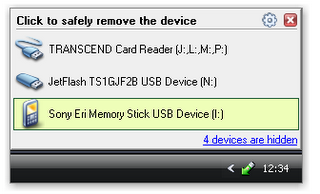
Singkat saja, ini adalah sebuah Software yang berguna untuk mempermudah proses mencabut dan memasang perangkat hardware yang terhubung dengan komputer anda melalui port USB. Entah itu Flashdisk, HardDisk External, Card reader, Printer, dll. Nah, Silahkan Download Di Bawah Ini.


Drive Blocker 1.4

Drive Blocker 1.4
Photobucket
Ok, fungsi utama software ini adalah ngeblock akses dari removable drives seperti Flashdisk, HD External, CD/DVD drive, Floppy drive, Dan Laen-lain. Akses ke removable drives tersebut akan diblock, dan untuk mengembalikan hak aksesnya anda harus membuka layar utama drive blocker dengan klik 2 kali pada tray icon-nya, dan kemudian memasukkan password yang benar.

Ketentuan diatas harus dilakukan sebelum anda memasukkan removable drive anda. Jadi lebih gampangnya masukin pass-nya terlebih dahulu untuk membuka akses, Kemudian pasang Flash Disk anda. Dan apabila tetap terjadi masalah, jangan lupa dicoba restart terlebih dahulu.
 

Jadi tujuan utama softwarenya kurang lebih :
1. Mencegah orang lain dari mengcopy file anda, ataupun menaruh file/software ke komputer anda.
2. Mencegah penyebaran virus, trojan, dan worms dari sumber yangg tidak diinginkan. Kalau kita sendiri yang memasukkan tidak terlalu Parah, tapi apabila orang lain yang membagi-bagi virus ke komputer kita, apalagi tanpa izin, kan bikin kita repot jadinya.
3. Tentu saja, mencegah pencurian data dari komputer anda.
Well, softwarenya lumayan extreme yah. Sepertinya lebih cocok untuk komputer kantor, sekedar ingin share saja sih, siapa tau ada yg butuh. Oh iya, untuk sementara baru bisa jalan cuma di XP dan tidak di OS dibawah XP, kalau vista kurang tahu dah, belum pake vista soalnya. Nah, Silahkan Download dibawah ini untuk mencobanya.

DOWNLOAD

Hide Secret Files 3.0

Hide Secret Files 3.0
Software ini memiliki fungsi yang cukup simple, yaitu menyembunyikan file atau folder pribadi anda dari orang lain. Tidak seperti software yang sebelumnya yang bisa meng-encrypt atau me-lock file/folder, fitur utama software ini adalah menyembunyikan file/folder pribadi anda, dan file/folder tersebut tidak akan dapat terlihat walaupun didalam safe mode.

Cara mempergunakan Software ini sangatlah simple, tinggal anda pilih file/folder yg ingin disembunyikan, Kemudian klik "Hide". lalu bagaimana untuk mengembalikannya ke semula? Jawabnya Tinggal pilih file/folder yg mau kembalikan, kemudian klik "Unhide"  Selesai...
Bagaimana..? Simple Kan... 
Nah, Untuk Mendapatkan Software Hide Secret 3.0 ini, Anda bisa Download File Dibawah ini.

Portable Everest Ultimate 5

Photobucket
Portable Everest Ultimate 5
Mungkin beberapa dari kalian sudah mengetahui, ini adalah Software yang berfungsi untuk memberikan laporan panjang lebar mengenai hardware komputer anda beserta software yang terinstall didalamnya, serta tidak lupa juga disediakan fitur benchmark untuk menguji kinerja sistem anda. nah, Untuk mencobanya anda bisa instal softwarenya dengan mendownload Filenya dibawah ini terlebih dahulu.
DOWNLOAD

Fresh UI 8.26

Fresh UI 8.26
Photobucket
Software ini dapat anda gunakan untuk memodifikasi windows sesuai dengan selera anda.
Entah itu untuk masalah performance (shutdown/startup lebih cepat, optimisasi cache processor, dll), security (menghilangkan my recent document, men-disable right click dari start button, dll), ataupun membersihkan junk file serta menghapus jejak-jejak yg ditinggalkan oleh komputer anda.

Computer Security Folder Lock 6

Folder Lock 6
Photobucket
Belum puas dengan Folder Guard ?
Pengen cobain yang lebih simpel dan mudah untuk dipake?
Keknya kamu harus coba Folder Lock.
Di versi barunya yang saya liat tampilannnya jelas berubah dan ada beberapa fungsi tambahan.
Anda bisa menggunakannya untuk meng-encrypt ataupun me-lock file/folder anda.
Program bisa jalan dalam stealth mode, yang dimana program akan benar-benar hilang dari windows dan hanya orang yang tahu hotkey-nya saja yang bisa membuka folder lock.
Anda dapat meng-encrypt file/folder kedalam sebuah "lockers" yang bersifat portable sehingga bisa dibawa didalam usb, cd/dvd, ataupun notebook anda. Pokoknya pakenya mudah dan tidak ribet, tampilannya menarik, tetapi tetap powerfull

Download

Computer Security Passware Kit 8 Enterprise


Passware Kit 8 Enterprise
Anda mencari solusi password recovery yang komplit?
Well, Passware Kit Enterprise adalah yg anda cari. Tidak perlu lagi bingung mencari software untuk merecover password dokumen word, excel, rar, ataupun jenis2 file lainnya
Download

Free Download Portable Trojan Remover 6.6.5 Build 2507


Portable Trojan Remover 6.6.5 Build 2507
INFO:
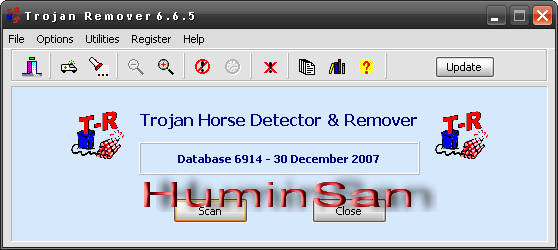
Trojan Remover aids in the removal of Malware - Trojan Horses, Worms, Adware, Spyware - when standard anti-virus software either fails to detect them or fails to effectively eliminate them. Standard antivirus programs are good at detecting this Malware, but not always so good at effectively removing it. Trojan Remover is designed specifically to disable/remove Malware without the user having to manually edit system files or the Registry. The program also removes the additional system modifications some Malware carries out which are ignored by standard antivirus and trojan scanners.
Windows 98/ME/2000/XP/VistaVersion 6.6.5
- Added new heuristic detection routine for Adware.NaviPromo files.
- Improved detection of usermode rootkitted files.
- Added routines to remove hidden registry keys/values during PC restart if they cannot be removed normally.
- Added information on whether UAC is enabled/disabled in Windows Vista/Server 2008
DOWNLOAD