Showing posts with label Photoshop. Show all posts

Apply effects to personal photos and original Facebook


By using this service you can apply effects MessMyPhoto original and fun to your personal Photos Online. There are several effects to alter the appearance of images, and also you can also upload photos of your Facebook profile. At the end of the changes simply save the image on the PC.

Click HERE to connect to the website and hit "Start editing". Upload the photo you want to edit and apply the effect you want. Finally, save the final result by pressing the "Save photo". Under GRAPHICS many other services are available to edit photos.

VIEW SIMPLE EFFECT

Surgery Beauty Retouch Mode On Features Panasonic Cameras

Innovation in pocket digital cameras did not just stop at the implementation of Hi-Def video and magnitude of megapixels alone, but also in other creative features. Recent example can be found in the ranks of the latest pocket cameras Panasonic output.

Some of the Panasonic Lumix range of cameras that have been equipped with touch screen, now rely on new features related to beauty, the Beauty Retouch.

What's that mode Beauty Retouch mode? Beauty Retouch is a feature that will allow you to edit photos in an instant through the camera without the need to help the computer device. You could say Beauty Retouch mode feature is an enhancement of previous Panasonic Cosmetic mode.

The second difference lies in the completeness of this feature and how to use options. If the feature Cosmetic mode you can only do limited photo editing change the level of light dark skin color alone, the Beauty Retouch mode, you can perform a variety of other adjustments that much more complete on the face in the photo.

Cosmetic mode will be active while you record the image. While Beauty Retouch mode can only be used after the photo was taken. Beauty Retouch Mode adjustment consists of two distinct parts of Aesthetic Retouch Retouch and Make-up.

The first is the Aesthetic Retouch. Here are five adjustments that can be done, including fashion 'clear skin' that serves brighten skin tone, 'shine removal' to remove stains that appear on the face, 'whitening of teeth' to whiten teeth, 'lift up' to give effects on the cheek to make it look more gaunt, and 'eye emphasis' that serve to give effect to your eyes look bigger. So arguably, an effect that is in Aesthetic Retouch like the effect of digital plastic surgery results.

The second is a Make-up Retouch. This option consists of several make-up effects that can be added on your face. There is an option 'foundation' to give the effect of foundation, 'lip color' to provide color to the lips, 'cheek color' to give effect blusher and 'eye shadow' to give effect to the eye coloring.

This one feature is quite handy if you shoot a friend or spouse who has not had time to dress up so they will not be disappointed when viewing images with a face that is too "plain".

What to watch, make sure the appropriate angle shooting. If the images of faces taken from the side or from a rather unique angle, like from above or from below, the camera will be difficult and will even fail to deliver maximum results to dress your shot.

So, make sure the face is taken from the front so you can beautify your subject. All these features can be enjoyed on the latest Panasonic pocket camera models that have used a touch screen like the Panasonic Lumix DMC-FP7 and the Panasonic Lumix DMC-FX78.

PhotoInstrument 5.1.513 FULL

PhotoInstrument is a powerful and easy-to-learn raster graphics editor used to process digital photographs.
With only a few clicks, anyone can solve most digital photo problems :
  • Photo Editing
  • Photo Retouch
  • Draw MakeUp
  • Make your photo look like it's taken by a professional Photographer.

If you ever wonder to touch up your photo, so you look more beautiful on your facebook or friendster or even on myspace, well this software is the answer to your question.

Look down for it is important features :
  • Overlay two and more images.
  • Drag and drop to open photos in this photo editor.
  • Copy/Paste image from Clipboard.
  • Batch Resizing (resize multiple images)
  • PSD file (PhotoShop Format) support in Editing.
  • Multi Language support.
  • Save to computer as .jpg, .png, .bmp and other file formats.
  • And many more features...
Current version includes these instruments :
  • Liquify
  • Clone
  • Smudge
  • Skin Cleaner
  • Glamour Skin
  • Dodge / Burn
  • Brush
  • Blur
  • Sharpen
  • Colorize
  • Scale
  • Rotate
  • Red Eye Removal
  • Brightness-Contrast
  • Adjust Color Levels
  • Glow
  • Healing Brush
  • Denoise
  • Object Removal
  • Crop
DOWNLOAD :

Free Download Adobe Photoshop

Product Specifications

Platform: Windows
Licence:
Version: Full version
Language: English
DOWNLOAD


Product Description:

As the market leader for commercial bitmap and image manipulation software, Adobe Photoshop is continually improving its flagship product to ensure that its features, efficiency and results maintain industry-leading standards. Since 1987, Photoshop has made enacting the images of your imagination a possibility with its powerful, sophisticated innovations.

Adobe Photoshop CS5 software redefines digital imaging with powerful new photography tools and breakthrough capabilities for complex image selections, realistic painting, and intelligent retouching. Enjoy cross-platform 64-bit support and a wide range of workflow enhancements.

Adobe Photoshop CS5 Features :
  • Complex selections made easy Get precise results in fewer clicks when selecting intricate image elements, such as hair, and eliminate background color around selection edges. Automatically vary selection edges and perfect masks using new refinement tools.
  • Content Aware Fill Remove any image detail or object and watch as Content Aware Fill magically fills in the space left behind. This breakthrough technology matches lighting, tone, and noise so it looks as if the removed content never existed.
  • Superior HDR imaging Create photorealistic or surreal high dynamic range (HDR) images with unprecedented speed, control, and accuracy. Get better-than-ever results thanks to automatic ghost removal and greater control with tone mapping and adjustments, and even give single-exposure photos the look of HDR.
  • State of the art raw image processing Use the Adobe Photoshop Camera Raw 6 plug-in to nondestructively remove image noise while preserving color and detail; add grain to make digital photos look more organic; enjoy more control as you perform post-crop vignetting; and more.
  • Extraordinary painting effects Achieve natural and realistic painting effects with the Mixer Brush, which offers on-canvas color blending, and Bristle Tips, which let you create lifelike, textured brushstrokes.

Anarchy Digital Backdrop Designer v1.5

Digital Anarchy Backdrop Desiner v1.5 (x86/x64) | 25.6Mb

Digital Anarchy company announced a new product called Anarchy Backdrop Desiner v.1.5. This is a - an additional module for Adobe Photoshop and other compatible products, allowing you to create a variety of backgrounds. The program will be useful, especially for photographers working on portraits, posters, etc. in Backdrop Designer include six hundred harvested textures that can be mixed, set with built-in light and shadow effects.

Create digital backgrounds for photography and other design mediums with Backdrop Designer. Pick from hundreds of premade digital backdrops, or customize your own presets. This Adobe Photoshop plugin creates beautiful resolution-independent backdrops, very similar to those expensive muslin drapes you may currently have in your photography studio.
  • http://hotfile.com/dl/95634894/9e478b0/DABD15.rar.html
  • http://www.fileserve.com/file/n3CYhxP/DABD15.rar
  • http://www.filesonic.com/file/55020426/DABD15.rar

Collection Photoshop Plugin

One Software makes award-winning plug-ins for Adobe Photoshop, Adobe Lightroom & Apple Aperture that make digital photography easier, faster and better. Photographers use onOne plug-ins to speed up their photo editing workflow and give their photos the professional look with just a few clicks. Download a free trial and learn why onOne is the industry leader in Photoshop plug-ins.
List :
  • On One Genuine Fractals Professional v6.0.7
  • On One Perfect Photo Suite 5.5
  • On One PhotoTools 2.5.4 Professional
  • On One PhotoTune 3.0.5
  • On One Software FocalPoint v2.0.2
  • On One Software Mask Pro 4.1.9a
Home :

Code : http://www.ononesoftware.com/
DOWNLOAD
Download :
Part 01.rar
Part 02.rar
Part 03.rar
Part 04.rar
Part 05.rar
Part 06.rar
Part 07.rar

Advanced JPEG Compressor 2009

Advanced JPEG Compressor 2009

Photobucket
Nah setelah sebelumnya saya memberikan software untuk retouch photo, sekarang saya akan memberikan anda software untuk mengcompress dan mengedit foto digital.
 

Kurang lebih fungsi utamanya ada 3, yaitu :
1. Mengurangi besar file gambar secara signifikan tanpa mengorbankan kualitas gambar.
2. Mengedit image sesuai dengan keperluan. Misalnya untuk resize image, yang kemudian akan digunakan untuk thumbnails, foto untuk websites, iklan atau ads, web graphics, dan lain2.
3. Dan tentu saja untuk meng-convert image dari berbagai format ke format JPEG.


Ada juga fitur membuat custom profiles untuk batch processing tasks yang berbeda, sehingga dapat memudahkan anda dalam memproses foto dalam jumlah yang banyak. Namun sepertinya review ini tidak lengkap apabila tidak saya beri contoh gambar, karena itu saya akan memberikan contoh gambar dari koleksi foto saya, fotonya beresolusi sangat tinggi yang kemudian saya crop dengan photoshop dan untuk outputnya saya pilih kualitas paling tinggi (12). Nah kemudian saya akan compress file tersebut dengan software ini dengan tingkat kompresi hampir 90%. untuk mendapatkan Software Advenced JPEG Compressor ini, Anda bisa downloa File dibawah ini.
DOWNLOAD

Photo Editor PhotoInstrument 2


PhotoInstrument 2
It is a free graphics editor used to process digital photographs. It may generally be used to retouch pictures to make it more nice views. So for example you have a photo that would be displayed on facebook or myspace but confusing to edit a picture that looks more Good wear what. Some would immediately thoughts photoshop software, but of course not everyone can use Photoshop. Now put on this Application, you can use it for photo editing, photo retouch, or drawing MakeUp.

"But it probably would be a little bit difficult to use if you are the first time using this application, let alone have to learn its functions", but do not give up, though small, in it there is a video tutorial that lasted more than 20 minutes to teach you how to use the software for a variety of problems that you may face in photo retouch.

Coral Clock 3D Screensaver

Coral Clock 3D Screensaver
Photobucket
Screensaver cantik yang akan memanjakan mata anda dengan pemandangan bawah laut yang spektakuler. Animasi yang mulus dengan teknik pencahayaan yang menakjubkan dan musik yang asyik untuk didengar, salah satu screensaver tercantik yang pernah gw lihat
Download

Free Download Photodex ProShow Gold 4


Photodex ProShow Gold 4
Mau bikin SlideShow? Jangan andalin Nero ataupun software video editor all in one lainnya, Mau bikin slideshow ya pake software khusus bikin slideshow aja,Yang jelas cara gunainnya mudah bgt, tinggal drag en drop photo, music, dan video kamu lalu edit seperlunya. Yap, anda bisa edit video, music, bahkan photo yang kamu punya, seperti menghilangkan efek mata merah, memberi efek fade in / out pada music, dan lain2.
Software ini juga dilengkapi efek2 transisi yang jumlahnya lebih dari 280, dibanding nero yang jumlah transisinya cuma secuil doank.
Download

PHOTO HDRi 2.30 - MediaChance Dynamic

MediaChance Dynamic-PHOTO HDRi 2.30

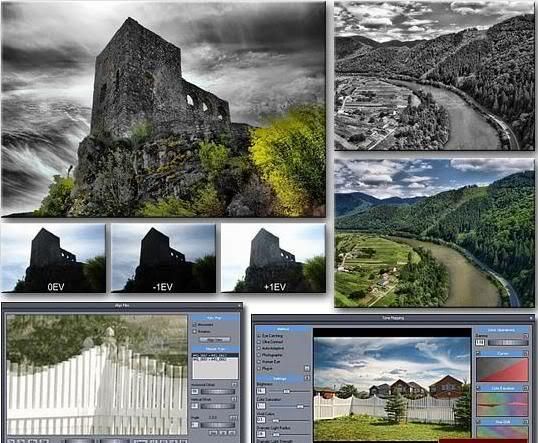
New generation of High Dynamic Range Photo software with Pin Warping and Anti-Ghosting. Using HDR technique we can combine the different exposures to create a single image that shows details in both sky and the land. The High Dynamic Range Imaging is a set of techniques that has been developed nearly 20 years ago to overcome the limitations of electronic devices. A HDR photography can be created by taking few photos with different exposure, then combining them in the software into a high dynamic file. The last thing is to tone-map the HDR image so we can see it in our screen, print it, post on web and enjoy.

Dynamic PHOTO We created our software to be enjoyable, fast and straight forward. And as it is common for Mediachance products we added few cool new things that you may not have seen yet in a package of this price.

> Easy to understand software with fast results
> Powerful Auto-Aligning, Manual or Auto-Assist Aligning of images with an innovative Pin Warping that can correct all types of misalignment, including camera roll, pitch or yaw
> Anti-ghosting mask that can completely eliminate ghosting of moving objects
> Various tone mapping procedures that can create a whole range of images - from smooth photographic tone mapping to very dramatic images
> Very fast preview of the mapping
> Load and save HDR files
> Works with most RAW camera formats

Dynamic-PHOTO uses very clear and polished interface.
Pin Warping
Aligning image taken by hand is not any big problem in our software. The unique Pin Warping method can align even most stubborn images where camera shifted, changed roll, pitch or yaw.
Anti-Ghosting Mask
If an object moved while you were taking different shots, this would normally create a “ghost” on the final image. We added a powerful yet very simple to use anti-ghosting mask feature. Just paint over all instances of the moved objects (you don’t even have to be very precise!) and it will without trace completely eliminate the ghosts from the final image.
Once a moved objects are marked, the Anti-Ghosting process will automatically elliminate the ghosts and keep only one instance of the object.
For:
Native W98/XP/2000/VISTA
MAC via BootCamp, VMware Fusion or Parallels.
Latest Version 2.3 ( 16/JAN/2008)
– Advanced Light Mask for the Eye Catching method which allows to fine tune the mapping using variable strenght for different tones.
– Support for newest RAW files such as Fuji RAW and Canon 40D
– Support for 360 Panoramic images
– Improved Alghorithm now completely eliminates the black bars on the right and bottom edges
– Added amazing Color Matching function and more filters such as Vignette and Mysterious Light. Together with the Match Color you can easily create feel of famous Dutch paintings (for example)
DOWNLOAD Rapidshare
DOWNLOAD Megaupload