Showing posts with label Computer. Show all posts

ASCII Art Generator

ASCII Art Generator
Photobucket
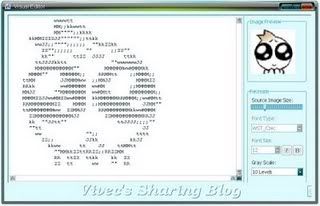
Kalian tentu pernah donk liat Ascii yang dibentuk seperti gambar, biasanya sih ada di file text yang terbawa bersama jamu dari "Software" ataupun "Game", Pernah penasaran kok hebat banget sampai bisa bikin ascii yang menyerupai gambar atau logo gitu?

Well, tidak perlu penasaran lagi pake software yang ini aja, Anda bisa mengconvert gambar yang anda punya ke dalam bentuk text, ataupun kedalam bentuk gambar tapi tetap tersusun dari simbol-simbol ascii. Lucunya anda bisa pake gambar yang ukurannya kecil banget (seperti avatar) terus diconvert dalam ukuran yang besar (cek screenshot saya diatas)
DOWNLOAD

Explanation About Cache Memory

Picture. Cache memory
Cache memory is very fast memory that is built in a Computer Central Processing Unit (CPU), or placed in a separate chip. The function of cache memory to store instructions that are repeatedly required and can be accessed very quickly to run programs, improving overall system. The advantage of cache memory is that the CPU does not have to use the motherboards system bus for data transfer. Whenever data must be passed to the system bus, the data transfer speed slows motherboard capabilities. CPU can process data much faster by avoiding the bottleneck created by the system bus. 

After most of the programs open and running, they use very little resources. When these resources are stored in the cache, the program can operate more quickly and efficiently. Cache in a computer system that is running the CPU with little cache can have lower benchmarks. Cache built into the CPU itself is referred to as Level 1 (L1) cache. Cache is in a separate chip next to the CPU is called Level 2 (L2) cache. Some CPUs have both L1 and L2 cache built-in and assigned as a separate chip cache Level 3 (L3)cache. 

Cache built in CPU faster than separate cache. However, a separate cache is still about two times faster than Random Access Memory (RAM). Cache is more expensive than RAM but a motherboard with a built-in cache very well to maximize system performance.
Picture. Cache Disk

Disk caching apply the same principle to the hard disk cache memory also applies to the CPU. Frequently accessed data on the hard disk is stored in a separate segment of RAM to avoid having to retrieve it from the hard disk repeatedly. In this case, RAM is faster than disc technology used in conventional hard disks. This situation will change however, because the existing hybrid hard disks everywhere. This disc has a built-in flash memory cache. Finally, the hard drive will be 100% similar to a flash drive, eliminating the need for a RAM disk caching, as flash memory is faster than RAM.

Ways and Tips on Choosing VGA

VGA stands for "Video Graphics Adapter", is an analog computer display standard first marketed by IBM in 1987. Although the standard VGA is no longer used because it has been replaced by a newer standard, VGA is implemented on the Pocket PC. VGA was the last graphical standard followed by the majority of computer graphics card manufacturer. Display Windows is still using the VGA mode because it is supported by many manufacturers of monitors and graphics cards. for more about VGA Details in here.
Tips For Choosing VGA, you have to know is that first you notice Slot VGA, whether it's AGP or PCI express slot.
Then select VGA serial number that you will buy. eg eg Ati Radeon HD 4650. serial number 4 shows the Direct Generation Xnya. if 4 is direct X 10, 5 direct X 11, etc. Both figures are 6 Demonstrate VGA Quality, below 4 means low - end, 4 and 5 medium - 6 to the upper end and high - end. So Be careful if you choose not mean Vga High The first figure was better than the previous generation numbers. Figures to - 3 and 4 - not so important. So you buy from the VGA HD 5450, HD4650 nicer because the second number is bigger, and Direct X is less effect on the quality of graphics, but there are some games are just Support direct x 11 only.

Well then, you do not bother to choose "DDR VGA" Because even if your motherboard has slots for VGA DDR 2 but can be used for any DDR RAM memory types used in VGA (GDDR) there is no direct correlation with the type of RAM used on the motherboard. they are both memory (RAM) but the real application of different scope of work. RAM on VGA card just to process the data in the VGA graphics card, while the RAM on the motherboard take to process all the data that is processed by the motherboard (Processor, VGA). So even if your main board will be installed DDR 2 DDR 5 is not a problem.

Furthermore, do not forget to buy the PSU or Power Supply is also a good thing for VGA that you will install, because if its less then it will not turn on, the greater the quality VGA (second number the greater), the greater the power required.

Technological means of communication by computer network

Computer Network is a system consisting of computer and other network devices that work together to achieve a common goal. The purpose of computer networks, among others :
a. Share resources, such as shared use of printers, CPU, memory, hard drive.
b. Communication, examples of electronic mail, instant messaging, chat
c. Access to information, for example web browsing.
In order to achieve the same goal, every part of the computer network to request and provide services (service). The party requesting the service are called clients (client) that provides services and called the waiter (server). This architecture is called client-server system, and used in almost all computer network applications.
Work Process Computer
Computer is an electronic device that is able to manage data and produce information. All entries received by the computer is called data. Such data may include text, figures, graphs, diagrams, and so forth. Furthermore, the data contained in computer processed using the programming language.

All incoming data will be converted into a binary number that can be read computer virgin. The data has been processed and then converted into a computer information. Information itself has meaning as an arrangement of data is arranged in such a way that has meaning to human understandable.

If we sort the computer information, it will get the velocity of information processing. Turnaround process is started from the user information, input, cpu, output and return to the user again.

Google and Samsung Launch Computer Devices Chromebox and Chromebook with Cloud-based

The world's largest search engine and its partner Samsung unveiled two new devices called Chromebook and Chromebox today. Google to target customers in the education and business. So computer owners can access from home, school or office.

The new engine is run by a cloud-based operating system that has been launched by Google three years ago, called Chrome OS. This operating system successfully combines the laptop / desktop local and cloud-based services. This new device has a faster boot times than other computer machine. By relying on Chrome OS, it also accelerates user access to Internet browsing. Both of these new devices allow users to launch applications in the blink of an eye. Google promised that they would perform the auto-update as often as possible while adding new features and ensure the new permanent tsb.

Chromebook launched today is the second version, after launching the first version last year that apparently did not attract many buyers because of the old device has a speed that is not ideal. Chromebook last model is a laptop that has a high-speed microprocessor made by Intel and has 4GB of RAM memory. Chromebook is portable and simple shape for versatile activities in school and work duties in the office. Chromebook from Samsung 12.1-inch, prices start at $ 449.

Chromebox a cloud-based computer is the first time known in the personal computer industry. Chromebox more like Apple's Mac mini is small in size to function as a desktop. To run this machine, the user must plug it into a monitor, mouse, and keyboard. Price Chromebox basic models is $ 329.

To jazz up the sales, Google is working with thinners like BestBuy electronics, Newegg.com, and Amazon. In the U.S., prospective buyers should try this new machine in an electronics store BestBuy.
(Images: www.google.com/intl